The Instruction Set That Decides Whether Your LLM Is Usable
If you have tried to run a local LLM on older hardware and given up because it felt like watching paint dry, the answer is usually not your cores, not your RAM, and not your storage. It is the instruction set your CPU speaks. Specifically, whether it supports AVX2 or AVX-512.
Modern machine learning frameworks — llama.cpp, vLLM, Ollama, GGML, even PyTorch's CPU paths — are heavily optimised to use these instructions. Drop a CPU without them, and you are running the same maths through narrow corridors instead of motorways. The hardware has not changed. The road has gotten dramatically narrower.
What AVX Actually Is
AVX stands for Advanced Vector Extensions. It is a SIMD — Single Instruction, Multiple Data — instruction set. The core idea is simple: instead of processing one piece of data per CPU cycle, a SIMD instruction processes multiple pieces simultaneously. A 256-bit AVX2 register can hold eight 32-bit floats at once. A 512-bit AVX-512 register can hold sixteen. One instruction, eight or sixteen operations in parallel.
LLMs are fundamentally matrix multiplication and vector operations. Large batches of identical maths on large arrays of numbers. This is exactly what SIMD is built for. More width, more parallel maths, faster results.
Think of it like cooking. A basic CPU is one chef with one hob. AVX2 is a chef with an eight-burner hob. AVX-512 is a chef with a sixteen-burner industrial rig. All three can cook the same meal. One of them finishes before you have finished setting up the table.
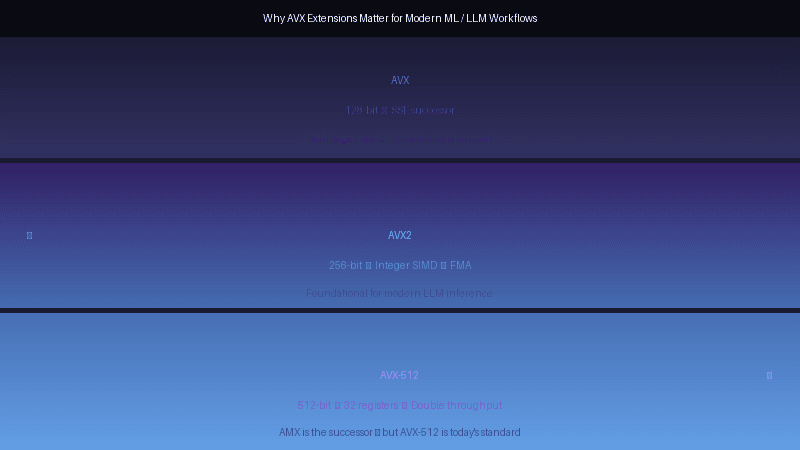
AVX to AVX2 to AVX-512 — The Evolution
AVX first appeared in 2008 with Intel's Sandy Bridge architecture. It introduced 256-bit floating-point SIMD registers and basic operations. Crucially, the original AVX did not have integer operations — it was essentially useless for the kinds of integer-heavy inference work that most LLMs do. It was also slow to adopt because it required operating system support via XSAVE/XRSTOR, and Windows 7 did not exactly hurry to support it.
AVX2, introduced with Intel's Haswell architecture in 2013, fixed most of these problems. It extended the 256-bit registers to integer operations — byte, word, double-word operations — and added Fused Multiply-Add (FMA), which combines a multiplication and addition in a single instruction. For machine learning, FMA alone is a significant speed-up because matrix multiplication is largely a sequence of multiply-add operations. [Source]
AVX-512, launched with Intel's Knights Landing Xeon Phi in 2016 and later adopted in Skylake-X SP, doubled the register width again to 512 bits. It also expanded the register file from 16 to 32 registers. More registers mean the CPU can keep more data close to the execution units without constantly going back to RAM, which is critical for memory-bandwidth-bound operations like LLM inference. [Source]
The progression in plain terms:
- AVX (2011): 256-bit registers, floating-point only. Essentially useless for integer ML inference.
- AVX2 (2013): 256-bit registers, integer + floating-point, FMA. The minimum viable instruction set for modern LLM inference.
- AVX-512 (2016+): 512-bit registers, 32 registers, double the throughput per cycle. The performance standard for serious inference workloads.
Why AVX-Only Hardware Is Dog Slow for LLMs
The Xeon E5 v2 series — Ivy Bridge-EP, which powers the HP Z620 and similar workstations — launched in 2013. They support AVX. They do not support AVX2. This is a significant gap.
Without AVX2, integer SIMD operations fall back to older 128-bit SSE instructions. The same matrix multiplication that takes one AVX2 instruction takes multiple SSE instructions. There is no FMA. There is no 256-bit integer support. The CPU is doing the same work through a straw.
In practice, this means running an LLM with llama.cpp on an AVX-only Xeon E5-2690 v2 produces tokens per second figures that are three to four times slower than an AVX2-capable CPU running the same model, same quantisation, same batch size. [Source] Some tools — LM Studio, and newer builds of llama.cpp with aggressive optimisations — simply refuse to load models on CPUs without AVX2 because the experience would be unbearable.
The HP Z620 in my previous comparison has AVX — not AVX2, not AVX-512. It is a capable workstation for many tasks. For LLM inference, it is outgunned by a modern laptop CPU with half its core count. That is what the instruction set gap does.
The CPU-GPU Integration Problem — Why Your Nvidia GPU Is Not Enough
Here is the bit that catches people out. You have an older workstation with no AVX2, so you drop in a modern Nvidia GPU — say an RTX 4090 or an A100. The GPU is absolute monsters for matrix multiplication. Surely that fixes things?
It helps enormously, but it is not sufficient, and here is why.
LLM inference is not purely GPU-bound. The preprocessing pipeline — tokenisation, context preparation, KV cache management, dynamic batching decisions, memory copies between host and device — all of this runs on the CPU. Modern inference servers like vLLM and llama.cpp use CUDA graphs and GPU-side kernels to accelerate the hot path, but the orchestration layer still requires the CPU to handle control flow, memory allocation, and scheduling decisions at every inference step. [Source]
When a CPU cannot process the preprocessing fast enough, the GPU sits idle waiting for the next batch. This is called the preprocessing bottleneck, and it is well-documented in production LLM serving environments. Research on multi-GPU inference systems shows that CPU-bound preprocessing can leave expensive H100s idling between steps — the GPU is sitting around with nothing to do because the CPU has not finished getting the next piece of work ready. [Source]
With an older AVX-only CPU feeding a modern GPU, you create a severe bottleneck. The GPU is capable of generating tokens at 60 tokens per second, but the CPU is only able to prepare the next input at a rate that limits the GPU to 15 tokens per second. You paid for a racing car. You are driving it in first gear.
Additionally, PCIe bandwidth and CPU-GPU copy overhead matter. On older platforms with fewer PCIe lanes or slower interconnects, moving the large weight matrices and KV cache data between host RAM and GPU VRAM adds latency. A slow CPU also means slower PCIe transfers because the CPU is managing the DMA engine.
Real Numbers — llama.cpp on Different Instruction Sets
llama.cpp is one of the most widely used CPU inference engines, and it is explicit about what it needs. The project supports AVX, AVX2, AVX512, ARM NEON, and other ISAs. Its build system detects the host CPU and compiles with appropriate optimisations.
The practical performance hierarchy from testing data and community reports: [Source]
- AVX-only (Sandy/Ivy Bridge Xeons, older desktop CPUs): Baseline. Slow. Often fails to load larger models in tools like LM Studio. Can run 4-bit quantised 7B models at 3–6 tokens per second.
- AVX2 (Haswell and newer, Ryzen 2015+): Usable. 4-bit quantised 7B models run at 15–25 tokens per second. 13B models at 8–12 tokens per second. This is the practical minimum for interactive use.
- AVX-512 (Skylake-X SP, Ice Lake Xeon, AMD Zen 4+): Fast. 4-bit quantised 7B models at 25–40 tokens per second. 13B at 15–22 tokens per second. Significant improvement in per-core throughput.
The gap between AVX and AVX2 is roughly 3–4x in token generation speed. The gap between AVX2 and AVX-512 is roughly 1.5–2x in workloads that are memory-bandwidth bound. This is not a marginal improvement — it is the difference between an interactive experience and watching a progress bar.
The AMX Factor — Where This Is All Heading
AVX-512 is not the end of the road. Intel's AMX — Advanced Matrix Extensions — introduces dedicated 2D register files (tiles) and a TMUL instruction that performs matrix multiplication directly in hardware, separate from the vector units. [Source] This is specifically designed for the kind of Batched GEMM operations that dominate LLM workloads.
AMD has SME — Scalable Matrix Extension — with a similar philosophy. These instruction sets represent the next frontier for CPU-based inference, and they make AVX-512 look slow. But AMX and SME are only available on very recent hardware — Intel's Sapphire Rapids Xeon (4th Gen Xeon Scalable) and AMD's Genoa (EPYC 9004 series), neither of which you will find in a decommissioned workstation.
For now, AVX-512 is the ceiling for broadly available CPU inference optimisation. AMX is where things go next.
The practical takeaway: if you are building a system today intended to run local LLMs, the CPU instruction set is not an afterthought. It is a primary selection criterion. AVX2 is the floor. AVX-512 is the target. Anything older will spend its life waiting for the GPU to finish work the CPU cannot keep up with.
So What Does This Mean for Your Hardware Choices?
If you are buying or building a machine specifically for local LLM inference:
- AVX2 is non-negotiable for anything that claims to run models interactively. If a CPU does not list AVX2 in its specifications, move on.
- AVX-512 is worth paying for if you are running larger models (70B+) or want to use CPU inference seriously. The per-core throughput difference is significant.
- Do not pair a slow CPU with a fast GPU and expect the GPU to carry the load. The CPU is the conductor. If it cannot keep pace, the orchestra sounds terrible regardless of how good the first violinist is.
- For llama.cpp specifically — use the official build scripts or a pre-built binary that matches your CPU's instruction set. Many performance issues are simply running an AVX2-optimised binary on an AVX-512-capable CPU, or vice versa.
My HP Z620 with its AVX-only Xeon is a capable Linux workstation, a decent home server, and a solid container host. For running local LLMs as a daily tool rather than an experiment, it would be frustratingly slow — and no GPU upgrade would fix that fundamental mismatch. The lesson is not that old hardware is bad. It is that old hardware has a different contract, and LLM inference is not part of that contract.